Showing posts with label Software. Show all posts

Sep 3, 2014

Print Screen Mac


1. Print screen semua
  • Tekan Command key ⌘ + Shift + 3 serentak
2. Print screen selected area 
  • Tekan Command key ⌘ + Shift + 4 serentak
  • Kursor akan bertukar ikon ini  +
  • Drag and select area yang nak di print scree
3 . Capturing from a selected application window:
  • Press the command key ⌘ + Shift + 4 
  • Kursor akan bertukar ikon ini  +
  • Press the SPACEBAR
  • Kursor akan jadi camera
  • Amik la gambar apa apa yg di kehendaki.. 
All step above... image akan ada di DESKTOP

:)

Dec 4, 2007

Scrap Book editor

saya telah test a few image editor (with some wizard to edit -- scrapbook.. etc)
~ as requested by ummi ~

Freeware Version : Scrapbook Flair (image 1)

Boleh di download secara free.. .. utk beginner.. it's a great tools.. banyak template dah di sediakan.. so just pick gambar.. dan edit-edit ayat / wording keliling tuh.. Hermp.. banyak orang guna.. so banyak review dan contoh-contoh utk di tiru.. (hehehe).. Macammana nak guna pun boleh tahan senang.. cuma tatau kenapa ada satu gambar atiqah jadik terbalik bila di export.. ehhehehe.. (belum abess blaja lagi apa ada tools dalam tuh.. )

Shareware version : Fotoslate 4 (image 2) -- recommended

Yang nih.. spesis kena bayar @ download free trial 30hari...@ * (atau tanya saya utk lebih maklumat bagaimana). Banyak featurenya.. utk buat scrapbook.. mmg senang & ada la template di sediakan.. more flexible & boleh direct alter & edit gamba.. (tukar kaler ke.. tukar gamba lain ke.. ) kalau tanya saya.. senang gile nak gune.. Kenapa saya suke ?? sbb dia ada function utk jimat space kalau nak print gambar.. macam orang buat photobook sume tuh.. dan siap-siap dah dia punya layout utk digunakan.. leh buat collage.. dan bla bla bla...

Nov 8, 2007

Freeware : Foxit PDF Reader

Foxit PDF Reader is an alternative to Adobe Reader, that allows you to view and print PDF files. Unlike Adobe Reader, it opens PDF files very fast, without any delay. It supports all the standard features, as well as browser integration, and also an option select/copy of text from the documents. Furthermore, you can create a snapshot from a selected portion of the page, fill interactive forms and more.

Pros: Much faster than Adobe Reader (..installation, open file and more.. )

Download here : Visit Site

Nov 7, 2007

Freeware : PDF Creator

PDFCreator is a free tool to create PDF files from nearly any Windows application.

Key Features:

  • Create PDFs from any program that is able to print
  • Security: Encrypt PDFs and protect them from being opened, printed etc.
  • Send generated files via eMail
  • Create more than just PDFs: PNG, JPG, TIFF, BMP, PCX, PS, EPS
  • AutoSave files to folders and filenames based on Tags like Username, Computername, Date, Time etc.
  • Merge multiple files into one PDF
  • Easy Install: Just say what you want and everything is installed
  • Terminal Server: PDFCreator also runs on Terminal Servers without problems
  • And the best: PDFCreator is free, even for commercial use! It is Open Source and released under the Terms of the GNU General Public License.
Err.. teknikal betul ayat amik dari website dia.. Basically boleh guna untuk create PDF file dari mana-mana application pun tanpa contoh : Words ke.. Excel ke.. apa-apa jekla.. yang korang pakai.. (asalkan dari applikasi tuh korang boleh PRINT FILE).. senang.. sangat senang dan FREE. Dulu-dulu nak create PDF file.. kena pakai Adobe Reader Pro version .. huih.. sekarang free (hehehe.).

Download here : Visit Site

OPENPROJ vs MICROSOFT PROJECT

OpenProj is a free, open source desktop alternative to Microsoft Project. OpenProj was downloaded over 100,000 times in the first full month it was released and has quickly become one of the most popular open source applications. If you are managing a group project we recommend Project-ON-Demand. If you want a free replacement to commercial desktop software, then OpenProj is perfect. It's available on Linux, Unix, Mac or Windows, and it's free

I have been to the format Microsoft training on Microsoft Project2003 which cost per licence RM12k.. (gilo aper?) So.. telah ku buat stadi sket.. cari free alternative for Project2003. Features, screen shots, menus.. sumenya similar.. kalau anda biasa dgn microsoft features.. YES this is the best alternative (FREEWARE) yang boleh digunakan utk kegunaan rumah ke.. office ke.. ape jek laa..

Download here : Visit site

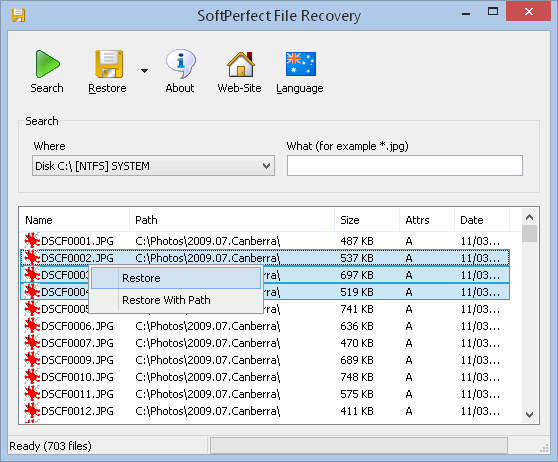
Freeware : SoftPerfect File Recovery

SoftPerfect File Recovery is a tool to recover accidentally deleted files from hard disks, USB flash drives, CF and SD cards and other storage media. We tested the program with images deleted from a USB stick and they were recovered without problems - however the program will not be able to recover any files if the media has been formatted (or files have been overwritten). SoftPerfect File Recovery supports popular file systems such as FAT12, FAT16, FAT32, NTFS and NTFS5 with compression and encryption


ini bukan sponsored entry.. cuma nak sharekan tools yang boleh diguna pakai sahabat-sahabat sekalian sekiranya anda tersalah / terdelete / sengaja delete tapi nak cari balik / atau apa-apa yang seumpama dengannya.. boleh la gunakan software nih dgn jayanya. Kita dah try ngan SD card camera.. carik balik *.jpg.. and it's turns out semua dapat recover balik ((yah yahh))..